
HubSpot Alternative: Switch to Rainmaker Reputation
Keep the follow-up habits. Lose the bill that grows three ways at once.

HubSpot is well-built software. Nobody serious disputes that. The reason small businesses leave is rarely the software. It is the billing model: per seat, per contact tier, and per hub, all moving at the same time, plus a mandatory onboarding fee before you send your first email. This page is the honest comparison: what changes when you switch to Rainmaker Reputation, what each system actually costs, and who should stay right where they are.
MIGRATION GUIDE
What changes when you switch from HubSpot to Rainmaker Reputation
The starter-to-pro cliff goes away. HubSpot Marketing Hub Starter lists at $20 per seat per month, but real automation lives on Professional: $800 a month billed annually, or $890 a month billed monthly, with three seats included and each extra seat at $45 a month. The Rainmaker Reputation CRM is $297 a month, flat. One number. It does not move when your team grows.
Your list stops being a billing meter. Professional includes 2,000 marketing contacts. Grow past that and contacts come in blocks, $250 per 5,000 on Professional, and HubSpot's own pricing page states that a contact tier you select cannot be downgraded until your contract renews. Success gets billed immediately. A slow quarter gets billed too. We charge no per-contact fees and run no contact tiers. The list is the asset. Grow it without watching a meter.
A human helps you move, and it is included. HubSpot charges a required one-time onboarding fee of $3,000 on Professional and $7,000 on Enterprise. We run two onboardings with every CRM account: a technical onboarding, where we help you connect everything to the CRM (and that is a lot), and a strategic onboarding, where we help you deploy your automation goals and plan the first 30 days so you move in the right direction as fast as possible. Behind both sits 24/7 live human support, including video how-to walkthroughs when your team gets stuck on a "how do I" question.
What does each one cost a five-person team?
HubSpot figures are Marketing Hub list prices checked November 25, 2026.
| HubSpot | Rainmaker Reputation | |
|---|---|---|
| Monthly cost, 5-person team | $100/mo on Starter (5 seats at $20, automation capped) or $890/mo on Professional at the annual rate ($800 base + 2 extra seats) | $297/mo flat, whole team included |
| Per-seat charges | Yes. $20/seat on Starter list price; extra Professional seats $45/mo each | None. Add team members at no extra charge |
| Contact charges | Billed by marketing contact tier; extra contacts sold in blocks; a selected tier cannot be downgraded until renewal | No contact tiers and no per-contact charges |
| Onboarding | Required one-time fee: $3,000 Professional, $7,000 Enterprise (Marketing Hub) | Two onboardings included: a technical setup and a strategic session that maps your first 30 days |
| Support | Channels expand by tier; phone support starts at Professional | 24/7 live human support, including video how-to walkthroughs |
| Review collection | Not a built-in plan feature; typically handled through third-party integrations | Built in. ReputationGenius automates review requests so you earn real reviews from real customers |
| Email and SMS automation | Email automation capped by tier: 1 automated action on Free, up to 10 on Starter, full automation on Professional. SMS is not part of the base plans | Email and SMS automation included |
| Social planning | Professional tier and up. Not offered on Free or Starter | Available through Social Planner, $49/mo |
| Booking | Included. The meetings tool is available even on free plans | Included |
Where your HubSpot stuff lives in Rainmaker Reputation
| In HubSpot | In Rainmaker Reputation |
|---|---|
| Contacts and lists | CRM contacts with smart lists |
| Deals and pipelines | Opportunities and pipelines |
| Workflows | Workflows and automations |
| Marketing email | Email and SMS campaigns |
| Landing pages and CTAs | Websites and funnels |
| Meeting links | Calendars and online booking |
| Conversations inbox | One inbox for SMS, email, chat, and social |
Your HubSpot switching checklist
Here is what you bring over. Anything that imports cleanly, we import. Anything that needs rebuilding, we rebuild with you in your onboarding sessions.
- Contacts and tags, via CSV import
- Pipelines and deals
- Email templates and campaigns
- Forms
- Landing pages
- Calendars
How the switch works
- Export from HubSpot. Contacts, tags, pipelines, and templates come out first. We show you exactly what to export and where each piece lands.
- Technical onboarding. We help you connect everything to the CRM: pipelines, calendars, email and SMS, websites and funnels.
- Strategic onboarding, then go live. We rebuild your follow-up, set your review collection running, and plan the first 30 days. Support stays live around the clock while you settle in.
Most owners are fully moved within their first week or two, because the two onboarding sessions are booked up front and the checklist above is short. Your data stays yours throughout.
Who should stay on HubSpot, and who should switch
HubSpot is best for companies with a dedicated marketing team, a budget for Professional or Enterprise, and a real need for its enormous app ecosystem (HubSpot advertises 2,000+ integrations) and enterprise-grade reporting, attribution, and customer journey analytics. If you have an operations person whose job includes running the CRM, HubSpot rewards that investment. And if all you need is a free place to store contacts, HubSpot's free tier is genuinely good. Use it until you outgrow it.
HubSpot is NOT for a small team that wants one predictable bill. It is not for a business whose contact list grows in bursts, because contact tiers bill the burst and refuse to give it back until renewal. And it is not for anyone who needs full automation on a Starter budget, because the features are gated a full tier above the price that got your attention.
Rainmaker Reputation is best for local businesses, consultants, and creators whose CRM has one job: turn interest into booked appointments, and booked appointments into reviews, referrals, and repeat customers. If speed to lead, automated follow-up, and owning your reputation are the priorities, that is exactly the system we run.
Rainmaker Reputation is NOT for a company that wants to buy software the enterprise way: per seat, per hub, negotiated tier by tier, with a procurement cycle and an admin whose job is running the tool. That is a different way of buying, and HubSpot is built for it. We sell one system at one flat price, built for the owner who wants it running this week, not next quarter. And we will tell you plainly: there is no free tier. The price is the price from day one, $297 a month, and in exchange the meter never runs on your seats, your contacts, or your growth.
Ready to leave HubSpot behind?
Run the five-year math, not the first-month math. A $297 flat rate costs $3,564 a year, every year. A Professional plan with five seats costs $10,680 a year before the $3,000 onboarding fee and before your contact list grows. Software should get easier to own as it proves itself, not more expensive. See current pricing or book a walkthrough, and we will map your first 30 days before you pay a dollar.
Frequently asked questions
Will I lose anything when I switch from HubSpot?
No. Your contacts and tags, pipelines and deals, email templates and campaigns, forms, landing pages, and calendars all have a home here. Most of it imports directly by CSV. Anything that needs rebuilding instead of importing, we walk through with you during your onboarding sessions.
How long does switching take?
Most owners complete the move in their first week or two. The two onboarding sessions are scheduled up front, and 24/7 live support is there whenever you get stuck.
What does switching cost?
There is no separate switching fee and no onboarding fee. Both onboardings are part of the CRM at $297 a month flat. Optional add-ons are priced just as plainly: an AI Voice Assistant runs $147 to $497 depending on the business, Social Planner is $49 a month, and ReputationGenius NFC Cards start at $27.
Does HubSpot charge per contact?
Yes. Marketing Hub bills by marketing contact tier. Professional includes 2,000 marketing contacts, additional contacts are sold in blocks, and HubSpot states you cannot downgrade your tier until your contract renews.
Does Rainmaker Reputation charge per seat?
No. The CRM is $297 a month flat, and adding team members does not change the price.
Is HubSpot free?
Yes. There is a free tier for up to 2 people with basic CRM tools and 2,000 email sends a month, with HubSpot branding on your emails and chat. Real automation starts on the paid tiers.
P.S. If you are in a HubSpot contract right now, check your renewal date and your contact tier today, not the week it renews. The downgrade window is the whole game, and it closes quietly.
HubSpot is a trademark of HubSpot, Inc. This comparison reflects publicly available pricing and plan information checked on November 25, 2026. Details may change, so verify current pricing on each vendor's site before you buy.
NEW! Introducing AI Assistant
Virtual Receptionist
Spam / Solicitor Screener
Conversational AI Texting
Appointment Booking
After Hour Answering Service
Real Time Notifications
Call Recording & Transcriptions
Onboarding & 24/7 Support
What Can Our AI Assistant Do For You?
Maximize YOUR Opportunities!

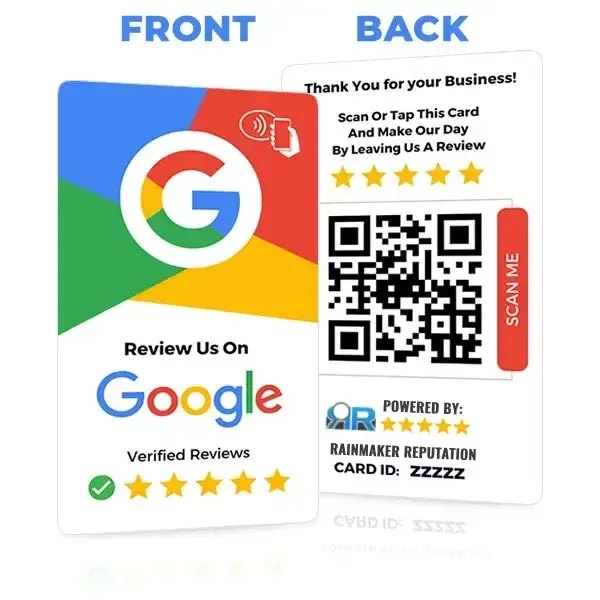
NEW! ReputationGenius Cards Are Here!

Our Reputation Review Cards Make It So Easy To Finally Get More Honest 5 Star Reviews...
Just Tap Their Phone And BEWM!

Let's hop on a call!
We will help you identify the trouble areas and
those quick & achievable wins in your business. Let's strategize and get you to
where you need to be.
This is a 100% free, no-pressure call! We will provide you with our best advice whether you
choose to work with us or not.

or
See What Our Clients Say
The Rainmaker's Edge Perspective: Gets Your Business Operations More Automation, AI, and other productivity gains with every episode
Use our convenient Review Calculator to answer these questions...

"How many more 5 star reviews do I need to climb out of my current score?"
"If I increase my score what will that do for my business?"
"How do I increase my review score?"
New Features Every Week
Events Attendee App (2026) — Rainmaker Reputation
Events Attendee App (2026) — Rainmaker Reputation
Let me cut through the noise on this one: we have just added the Events Attendee App, a dedicated attendee app inside the Client Portal that consolidates event discovery, ticketing, schedules and networking in one place.
Until now, running an event meant separate platforms for registration, schedules and attendee communication. Three logins. Three bills. Three places for something to break on the day it matters most. That fragmentation is the enemy, and event management is hard enough without it.
What is the Events Attendee App?
The Events Attendee App is a unified app experience on web, iOS and Android where attendees purchase tickets, browse sessions and connect with exhibitors. Organizers enable it per event inside the Client Portal.
Attendees save sessions to a personal schedule and store QR tickets in Apple Wallet. They receive automated push notifications instead of hunting through email. You manage automated confirmations and broadcast announcements directly to selected roles, from the same marketing technology for local business you already run.
Why does one attendee app beat separate event tools?
One attendee app beats separate tools because every extra platform is a leak: a missed confirmation, a lost ticket, a schedule nobody can find. Write this down: an attendee fighting your software is an attendee who is not meeting your sponsors, your speakers, or your next offer.
- Money in: attendees buy tickets inside the app instead of abandoning a clumsy checkout somewhere else.
- Money kept: ticketing, schedules and communication live in one system — no fragmented software tools to pay for and babysit.
- Control: attendees connect through QR badge scans, and exhibitors get tiered banner ad placements — real lead generation for sponsors and exhibitors, not a logo on a wall nobody reads.
Who is the Events Attendee App best for — and who is it not for?
It is best for event organizers and community managers who run events where attendees need tickets, sessions and networking in one place. Workshops, conferences, community events — if people check in, sit in sessions and meet each other, this was built for you.
It is NOT for a business that never runs events. No events, no benefit — do not enable tools you will not use. Trade-off, stated plainly: attendees must sign in through the web, the Client Portal app or your branded app, so a room full of walk-ins with no sign-in habit still needs a human at the door. Compared to separate platforms, the app wins on consolidation; a specialist platform still wins if you need nothing but registration and nothing else.
How do you set up the Events Attendee App on Monday morning?
You set it up by enabling Attendee App access on a specific event, in four steps:
- Go to Events, select a specific event, and choose Attendee App.
- Enable Attendee app access, and optionally toggle Make this event discoverable.
- Direct attendees to sign in via the web, the Client Portal app or your branded app.
- Manage automated confirmations and broadcast announcements directly to selected roles.
Four steps, before your next event goes on sale — and attendee messages stay where your team can see them, alongside the rest of your all-in-one inbox for customer communication.
What should you do before your next event?
Enable the app on one real event and test it like an attendee: buy a ticket, save a session, store the QR ticket in Apple Wallet, and scan a badge.
Here is your challenge: stop renting a patchwork of event tools that do not talk to each other. Put your next event in one app your attendees actually carry in their pockets. Period.
FEATURES
Social Media Management
AI Agents
Search Optimization A.I. Agent
Review Collecting Systems
Forms & Surveys
Online Appointment Booking
Membership & Course Builder
Automated Nurture Sequence
Email & SMS
Phone System & Autodialer
Learn More
Compare:



Rainmaker Reputation AI CRM is a CRM & AI Automation suite that helps Local Brands, Business Coaches & Content Creators solve the problem of how to properly connect with prospects & customers in order to build profitable momentum & growth through getting their businesses more reviews, better reputations in their markets, & automated simplified CRM processes.